From WordPress to Next.js and Payload CMS
A personal website is supposed to represent what I can build.
That sounds obvious, but at some point I realized that my own website was no longer doing that very well.
My previous website was built with WordPress and hosted on Hostinger. It worked. It was easy enough to update, and for a long time, that was enough.
But over time, I started wanting something different.
As I was working more with Next.js, TypeScript, Linux and full-stack development, I felt that my own website should also become a project where I could apply those skills. Instead of continuing to customize WordPress, I decided to take the opportunity to rebuild the whole thing.
I also kept the original domain, so the identity of the website stayed the same while everything behind it changed.
Why I Wanted to Leave WordPress
My main reason was not that WordPress was bad.
WordPress is still a very practical solution, especially when the main goal is simply to publish content. But I wanted more control over the application itself.
It is extremely capable, but over time I wanted to have more control over the application itself. I wanted to build the frontend with React and Next.js, use TypeScript throughout the project, and have a CMS that felt more natural in that kind of development environment.
I also wanted to move away from the traditional idea that the CMS and frontend have to be tightly coupled.
That led me to Payload CMS.
Why Payload CMS
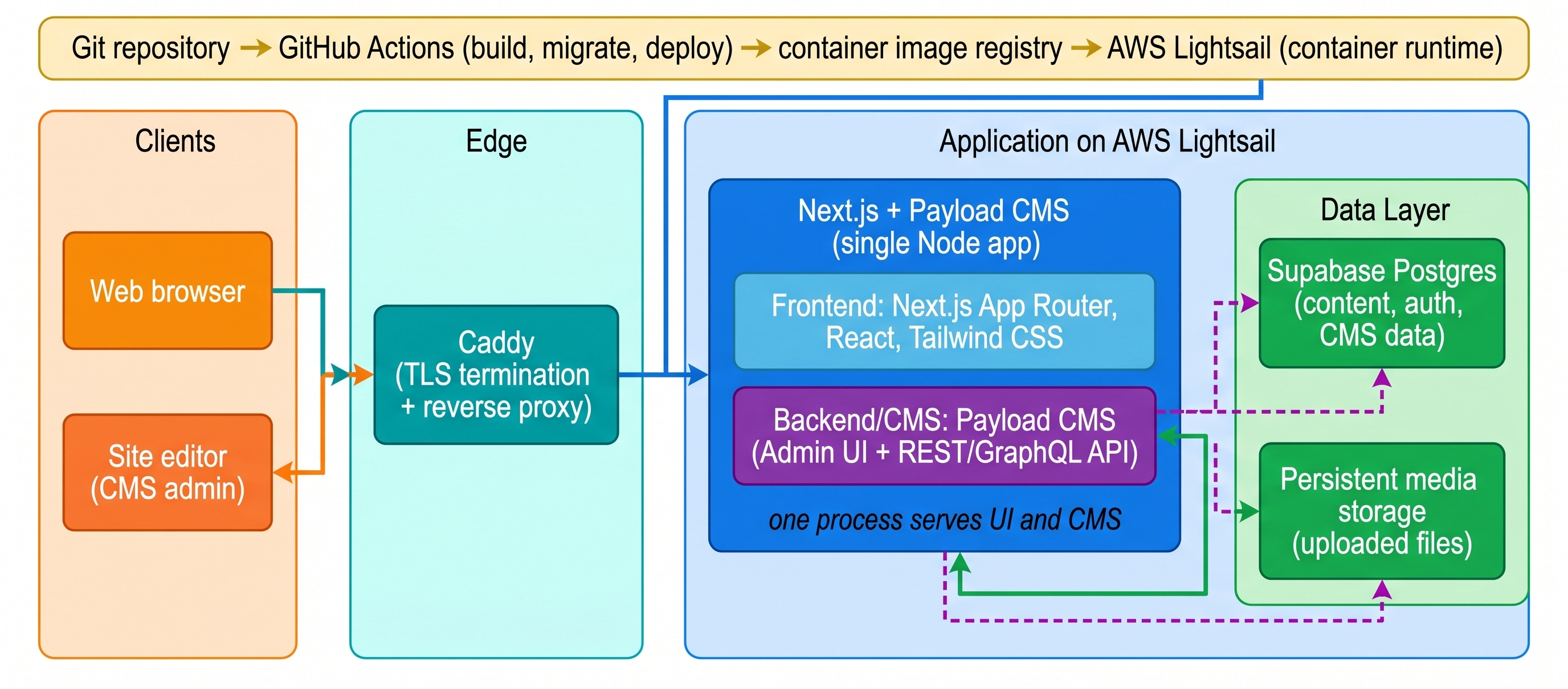
Payload CMS is a modern, self-hostable CMS built around Node.js and TypeScript. Instead of treating the CMS and frontend as completely separate technologies, Payload fits very naturally into a Next.js application.
That was the main reason I chose it.
I still get the convenience of having a CMS for things like projects, posts and media, but I can work with it using technologies I already enjoy using.
Another important point for me is that I can self-host it. I don't have to depend on a third-party SaaS CMS for my own website.
That said, Payload also means more responsibility.
WordPress hides a lot of infrastructure complexity from you. With Payload, I have to think more about the database, deployment, environment variables, backups and maintenance.
For a simple portfolio, this could definitely be over-engineering.
But for me, learning from the project was part of the purpose.
Rebuilding without throwing everything away
One of the more interesting parts of the migration was that I didn't actually want to redesign everything.
I had already invested a lot of time into the original PHP implementation, especially the frontend styles and layout.
So instead of treating the migration as:
Old website → completely new design"
I treated it more like:
"Keep what works, replace the underlying architecture."
The result is that the website still feels familiar, but the technology behind it is completely different.
This was also a useful reminder that modernization doesn't always mean changing the UI.
Sometimes the biggest improvement is underneath the surface.
Moving to AWS Lightsail
The old website was hosted on Hostinger. The new version runs on AWS Lightsail.
Lightsail provides a relatively simple way to run a virtual server on AWS without having to build a much more complicated cloud architecture.
For this project, it gives me enough control to manage the application, server and networking myself while still keeping the infrastructure relatively straightforward.
It also gives me the opportunity to learn more about what happens beyond the application code.
Why Caddy?
For the reverse proxy, I decided to try Caddy instead of using the more familiar Nginx.
Caddy is a modern web server and reverse proxy, and in my setup it sits in front of the Next.js application.
One feature I particularly liked is its automatic HTTPS support. Caddy can obtain and renew TLS certificates automatically for supported public domains, so I don't need to purchase a separate SSL certificate or manually manage certificate renewal.
It's a relatively small part of the system, but I wanted to try something new rather than automatically choosing Nginx just because it's familiar.
Git and CI/CD
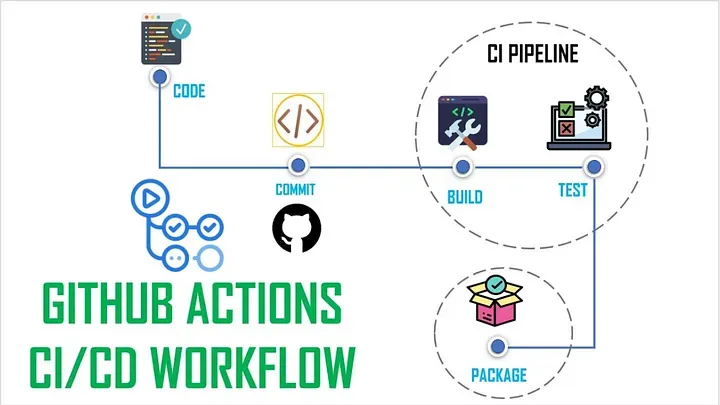
I also set up CI/CD through Git as part of the rebuild.
Instead of manually uploading the application whenever I make a change, the repository becomes part of the deployment workflow.
I can develop locally, commit and push my changes, and the deployment process takes care of updating the production application.
For a personal website, this isn't strictly necessary.
But again, I wanted the project to behave more like a real software project rather than just a website sitting on a hosting account.
Was it worth it?
From a pure "I need a personal website" perspective, probably not.
WordPress was already working.
The migration took time.
The new stack has more moving parts.
And now I have more infrastructure to maintain.
But that wasn't really the goal.
I wanted my own website to become a place where I could practice the things I actually enjoy doing: full-stack development, system design, deployment, infrastructure, and continuous improvement.
The visual design may look familiar.
The architecture isn't.
And for me, that's the most important part of the rebuild.